
The easiest way to accept crypto payments on your pricing page
The Oppi Payment Pricing Widget lets you display your plans and collect crypto payments directly on your website. Supports 40+ assets across five blockchain networks. Setup takes minutes, not days.
Everything your pricing page needs to accept crypto payments
The Oppi Payment Pricing Widget gives your website six tools to display your plans, collect crypto payments and track every transaction across 40+ assets and five blockchain networks from one dashboard.
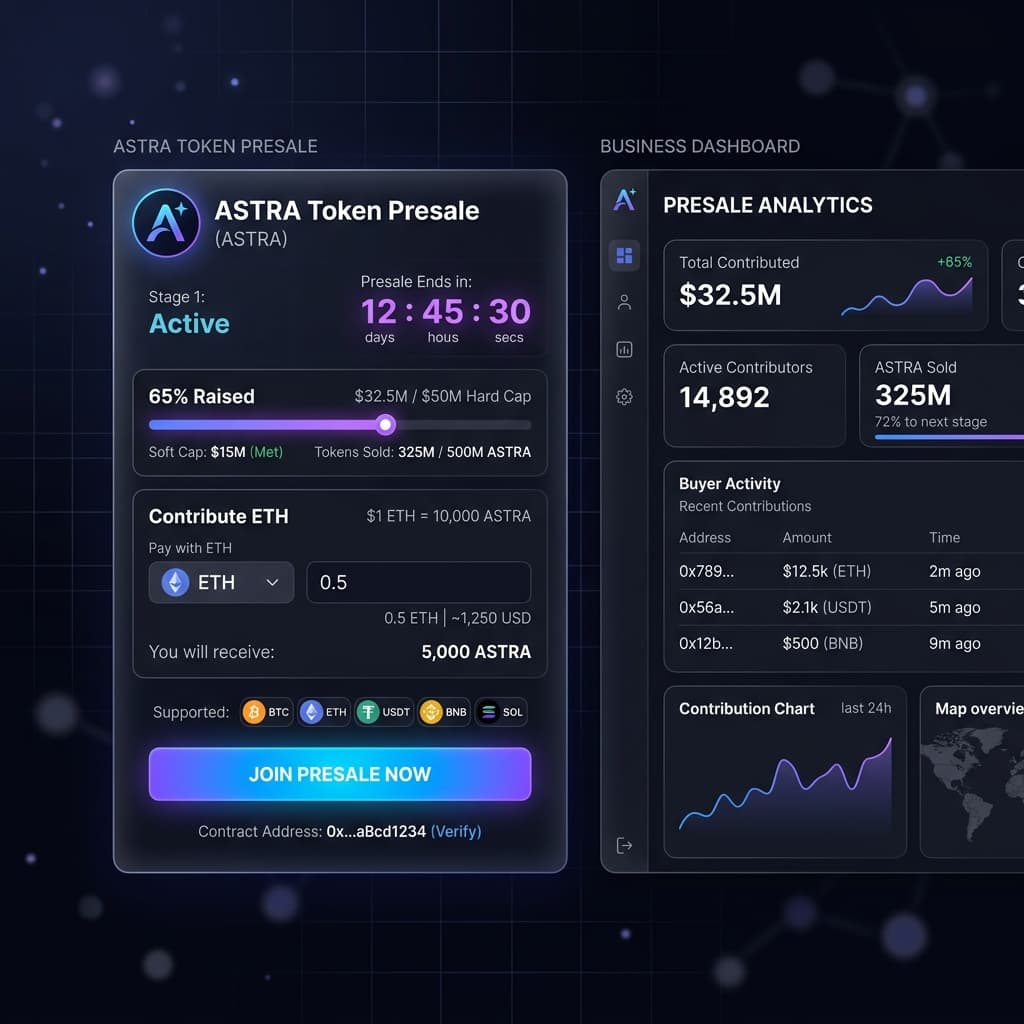
Any member of your team can set up the Oppi Payment Presale Widget without writing a single line of code. Build your widget from the business dashboard, copy the generated code and paste it on your website. Your token presale will go live quickly, without needing technical support.
Easily create multiple presale rounds with different pricing, timelines and token limits. This will help you control how your sale moves from one stage to the next effectively. You can easily manage each round clearly and give your community a better buying experience.
You can easily set different token prices for each presale round and adjust them as your sale moves forward. You can also offer bonus tokens to contributors who purchase in larger amounts. This gives you a flexible way to reward early support and keep demand building steadily.
Let your community know how much exactly has been raised against your presale target at any point. The live progress bar will update automatically as contributions come in, so buyers can see the current amount and remaining cap. This builds trust and keeps your sale transparent.
Customize the full appearance of your presale widget so it matches your website brand colors without editing any code. Simply adjust colours, fonts, text, and layout from the Oppi Payment dashboard and publish changes right away. Your buyers always see a clean experience which reflects your brand
Get important contributor details through custom input fields and make your widget live using clean and embed code. You can ask for names, emails, or wallet information before or after payment. Making the widget live on your site takes one simple step with no complex setup required.
Live your presale widget and start collecting presale contributions instantly
Once your widget is built and fully customized according to your brand colours, copy the generated copy from your Oppi Payment dashboard and paste it onto your website. The widget will go live as soon as your page is published. Now your contributors can easily join your token presale without leaving your website at any point.
Sign up for your Oppi Payment account and complete the short verification process. Once approved, you can access the Presale Widget from your dashboard.
Configure your token details, presale rounds and pricing from the Oppi Payment dashboard. Customise the widget design to match your brand and generate your code.
Every contribution made through your presale widget is tracked automatically. Raised amounts, completed payments and buyer activity are visible from your dashboard.
Best Suited For
Oppi Payment Presale is built for projects of all sizes.
Why businesses choose the Oppi Payment Presale Widget
Most token presale tools available today forces you to choose between speed, branding, or flexibility. But our Presale Widget gives you all three features from one single dashboard so you can launch faster, maintain your branding and make changes without any development work easily.
Launch Your Presale Faster
Most of the token presales take too long just to launch because every small change depends on the availability of the developer. But the Oppi Presale Widget gives your team a no-code way to build, customize and publish your presale from one dashboard without having to wait on technical setup.
Your brand stays front and center
Your presale contributors should never feel like they have been redirected to a third-party tool to complete payment. Every colour, label, token detail and button on the Oppi presale widget can be customized to your entire brand colours so the experience looks of your website only.
Designed around how token presales actually work
A token presale has some specific requirements that most generic payment tools do not offer, and the Oppi Payment presale widget is built around to fulfil those requirements. Like setting up multiple rounds, adjusting price between stages, offering bonuses and tracking contributions.
One dashboard for everything
Every pricing widget you create and every crypto payment your customers make is visible from your single Oppi Payment dashboard. No separate tools for tracking or reconciliation. One login gives you the complete picture from day one.
Every crypto asset your contributors can use to join your presale
To make your contributors trust more and save their swap charges, our presale widget accepts crypto contributions across multiple major blockchain networks. Your contributors can pay using whichever asset they are already holding and that too without swapping tokens or leaving your website at any point during the process.


Frequently asked questions about the Oppi Payment Presale Widget
The answers below cover the most common questions about the Oppi Payment Presale Widget. If you cannot find what you are looking for, contact the support team directly for help.